Lecture Notes 1 –
Introduction, programming with images
CSS
501 – Data Structures and Object-Oriented Programming
Reading for this
lecture:
Carrano, 5th Edition Chapter 1, Appendix A
Carrano, 6th Edition Chapter 1, Appendix A
To be covered in
this lecture:
- Introduction / syllabus
- Computing with images
- Assign program 1
Programming with
images
In this class, we will have programming assignments that deal with digital images. I am doing this for several reasons. I think these assignments will be considerably more interesting than the ones I have previously assigned. In addition, images are an important data type themselves. The vast majority of bandwidth used on the web is spent downloading images of various types. The use of images in daily life and work is becoming more common and it is easy now to upload digital images from a camera or from the web. Finally, while we will only scratch the surface of possibilities in this class, I hope that some of you will be interested in working with images in much more depth, since this is the area in which I do research.
A digital image is composed of a two-dimensional array of pixels. If the images has r rows and c columns, then there are r*c pixels in the image. Each pixel has a location and value. The location is given by the row and column of the pixel. The value depends on whether the image is binary, gray-scale (black-and-white), or color.
Binary images have only two pixel values: 1 (white) and 0 (black). Here is an example:
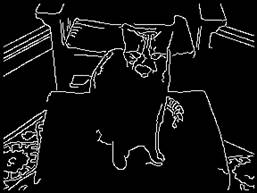

Up close, you can see the individual pixels in the image. (Look for example in the right eye of the cat.) If you look close enough, every digital image is composed of rectangles of a single solid color. These are the pixels. In most digital images, there are so many pixels, that the individual rectangles are difficult (or impossible) to see. The left image above has 216 rows and 288 columns (62,208 pixels), which is actually small as images go.
The pixels in a gray-scale (black-and-white) image take values (call the intensity) from 0 to 255 (1 byte = 8 bits of information). 0 is the darkest black and 255 is the brightest white.


Each pixel in a color image has three intensities, one for red, one for green, and one for blue (these are the primary colors of light). Three bytes (0 to 255) are thus used for each pixel in a color image. We will be using color images in this class, since they are the most interesting.


To get started, I am making available functions to read and write images. Here is a reference to the header file.
Program #1 assigned