Morgan E. Holen
Justin
Knobel
Liz Stevens
4/14/00
FE 345
PLSS
Website Search
1.) PLSS GIS Data from USGS
Public Land Survey
GIS Data
The
USGS Earth Resources Data Center (EROS) maintains a GIS database of the
PLSS. These datasets contain township
and section corners for the entire US.
There
are many applications for PLSS data in a digital format. For instance, this data could be placed over
a digital orthophoto to aid in monument location.
The
data are available as Digital Line Graphs (DLGs). DLGs contain vector data describing line maps (e.g. boundaries,
roads, etc.). USGS offers DLGs in 3
scales
·
1:2,000,000
·
1:100,000
·
1:24,000
The
EROS data download page is located at:
http://edcwww.cr.usgs.gov/doc/edchome/ndcdb/ndcdb.html
There
are links to several different datasets.
Click the DLG button with the desired scale. Options for that dataset appear below. There are a number of different methods for finding PLSS data on
the EROS FTP server: by alphabetical
listing, state listing, or graphically.
Often, the graphical method (follow the “FTP via Graphics” link) is
easiest, as the USGS placenames are not always intuitive. Once you get the FTP directory containing
DLG data for your area, go to the “public_lands” directory. Download the file with the sdts.tar.gz
extension.
This
contains the data in a compressed format (use a utility such as WinZip[1]
to decompress it). The data is in SDTS
format, which is an USGS interchange format.
You will need to convert the data from SDTS to DLG format, which ArcView
is able to import. The BLM provides a
small utility to perform this conversion.
It can be downloaded at:
ftp://ftp.blm.gov/pub/gis/sdts/dlg/sdts2dlg.zip
USGS
also provides free software to view SDTS DLG (and other) files called
“dlgv32”. The program and information
can be found at:
http://mcmcweb.er.usgs.gov/viewers/dlb_view.html
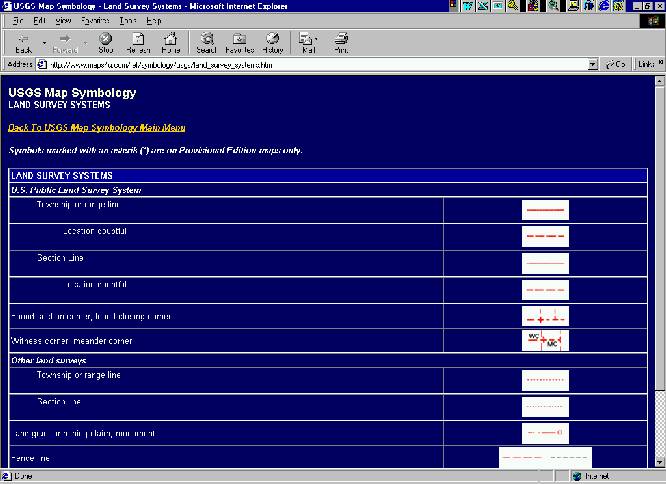
2.) USGS Land Survey System Map Symbology
http://www.maps4u.com/ref/symbology/usgs/land_survey_systems.htm
Provides
a legend of USGS land survey map symbols pertaining to the PLSS. From here, you can link back to the USGS Map
Symbology Main Menu where you will find Quick Links To Symbology Charts for
other map types.
3.) BLM Public Land Survey 1998
http://www.blm.gov/natacq/pls98/index.html
The BLM Public Land Survey site contains the complete text of the published hard-copy version of Public Land Statistics for 1998. There is also a link to 1997 statistics. A history of the disposition of public lands and development of the modern day survey system is also provided. We found the Cadastral Survey Actions Completed PDF file to be interesting because it gives statistics for original surveys, resurveys, special surveys, and monuments set by geographic state for a number of different land types (i.e. BLM land, USFS land, Bureau of Indian Affairs land, etc.). To get there, go to the website and click on PART 1 - LAND RESOURCES AND INFORMATION, then scroll down and download the Cadastral Survey Actions Completed PDF file.
4.) Legal Land Descriptions in Federal Township and Range System
http://www.outfitters.com/genealogy/land/twprange.html
Provides
a general description of the Public Land Survey methodology, with a link which
describes in detail how to locate tracts.
5.) BLM General Land Office Records
http://www.glorecords.blm.gov/search/search.asp
Search
the GLO’s land patent database for public lands deeded to private
ownership. Just select a state and fill
in at least one other field. It
retrieves records matching the fields you fill in. This site also provides resource lists for the original 13 colonies
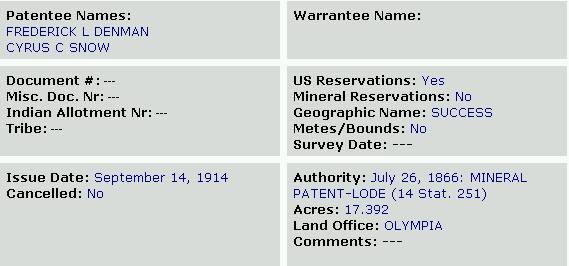
and for all 50 states. Below is a
record retrieved from filling in township NR/direction and range NR/direction
fields. We liked this site because you
can retrieve landowner and parcel information.